
How to Monitor Competitors
Learn how to monitor competitors across social media, forums, and communities. Track competitor mentions, pricing complaints, feature requests, and “alternatives to…” posts so you can spot market shifts faster.
In this section, we'll cover:
- 01 What competitor monitoring is The difference between monitoring, listening, and competitive intelligence
- 02 Why it matters (and what it replaces) How it beats quarterly research and stale competitor pages
- 03 What to track The competitor signals that actually change outcomes
- 04 Where to monitor Which platforms produce which competitor insights
- 05 Keyword playbook Exact keyword patterns: alternatives, pricing, churn, vs, comparisons
- 06 Alerts workflow How to triage signals and route them to the right team
- 07 Action playbooks Sales, marketing, and product responses you can ship immediately
- 08 Common pitfalls Noise traps and measurement mistakes to avoid
- 09 Next steps A simple weekly system you can run in 20 minutes
1. What Does It Mean to Monitor Competitors?
To monitor competitors, track what people say about competing products, brands, launches, pricing, support, and alternatives across public conversations — then use that signal to make faster, better decisions.
Monitoring (what happened)
Track mentions, posts, videos, threads, and engagement.
Example: “Competitor X launched Feature Y today.”
Listening (why it happened)
Understand patterns behind the mentions: pain points, objections, sentiment.
Example: “People hate their pricing changes and are switching.”
2. Why Monitoring Competitors Matters (and What It Replaces)
Most “competitive analysis” is slow: quarterly docs, stale teardown pages, or random notes in Slack. Social media is different — it’s where buyers discuss real problems in public, in the language they actually use.
- Faster messaging: Learn what competitors claim — and which claims get challenged.
- 🎯 Better positioning: See what people compare you against (often surprising).
- 💬 Sales enablement: Spot objections in the wild and build talk tracks that answer them.
- 🧠 Product intelligence: Discover competitor gaps, missing features, and “why I churned” posts.
- 📈 Content + SEO: Find exact phrases people use (“alternative to…”, “best…”, “vs…”) and turn them into pages that rank.
If you only do one thing: monitor “[competitor] alternative” and “switching from [competitor]”. Those are the highest-intent conversations in almost every category.
3. What to Track: The Signals That Actually Matter
Competitor chatter gets noisy fast. These are the signals that reliably turn into actions.
🔄 Switching & churn signals
People leaving a competitor (or threatening to).
Look for: “moving from”, “cancelled”, “too expensive”, “support is terrible”.
⚖️ Comparison & evaluation
Buyers narrowing down options publicly.
Look for: “A vs B”, “which should I choose”, “best tool for…”.
💸 Pricing & packaging tension
Price increases, plan confusion, billing complaints.
Look for: “pricing changed”, “hidden fees”, “per-seat is brutal”.
🧩 Feature gaps & requests
The “I wish it had…” moments that tell you where to build.
Look for: “missing”, “doesn’t support”, “need integration with…”.
📣 Launches & campaigns
New features, announcements, partnerships, ads, influencer pushes.
Look for: “announcing”, “launching”, “partnered with”, “sponsored by”.
🧑💻 Hiring & roadmap hints
Job posts can reveal focus areas (AI, integrations, enterprise).
Look for: “we’re hiring”, job titles, team expansions, location changes.
4. Where to Monitor: What Each Platform Is Good For
Different platforms produce different competitor insights. You don’t need to be everywhere — you need the right mix for your market.
X (Twitter): real-time launches + complaints
Best for speed: announcements, hot takes, pricing backlash, and “any alternatives?” posts.
Related: Twitter Monitoring
Reddit: deep comparisons + switching threads
Best for long-form evaluations, “I tried both…” reviews, and high-intent “alternative to…” threads.
Related: Reddit Monitoring
LinkedIn: positioning + enterprise objections
Best for B2B: decision-maker posts, vendor comparisons, and credibility-driven discussions.
Related: LinkedIn Monitoring
YouTube: reviews + “how-to” intent
Best for buyer education: reviews, alternatives lists, migration tutorials, and creator sentiment.
Related: YouTube Monitoring
If you’re starting from zero, begin with Reddit + X (Twitter). They surface the highest volume of competitor comparisons and switching intent in most niches.
5. Keyword Playbook for Monitoring Competitors
Keywords are the engine. Most teams fail here by using broad terms (noise) or only tracking competitor names (context-free mentions).
Start with these intent-driven patterns
High-intent competitor keyword patterns
[competitor] alternativealternative to [competitor][competitor] vs/[competitor] vs [you]switching from [competitor]/migrating from [competitor]cancelled [competitor]/leaving [competitor][competitor] pricing/[competitor] price increase[competitor] support/[competitor] refund[competitor] integration/[competitor] APIbest [category]/recommend [category]
Use “problem-first” keywords to uncover unknown competitors
Competitor monitoring isn’t only about known brands — it’s also how you discover what buyers think your category is.
“What’s the best social listening tool for competitor tracking?”
“Any good alternative to [category leader] for small teams?”
“Need a tool to monitor competitor mentions across Reddit and X.”
6. Turn Keywords Into a Daily Alerts Workflow
The hardest part isn’t finding competitor mentions — it’s turning them into consistent action. This workflow keeps signal high and time low.
🛠️ Manual monitoring (works, but brittle)
Use native searches and lists. You’ll catch some posts — and miss many more.
- Search for competitor names
- Bookmark “alternatives” threads
- Check daily (and forget on busy weeks)
🤖 Automated alerts (scales)
Use Alertly to track competitor keywords across platforms and get a digest you can actually act on.
- Add competitor + intent keywords once
- Receive a daily digest of matches
- Route insights to sales/marketing/product
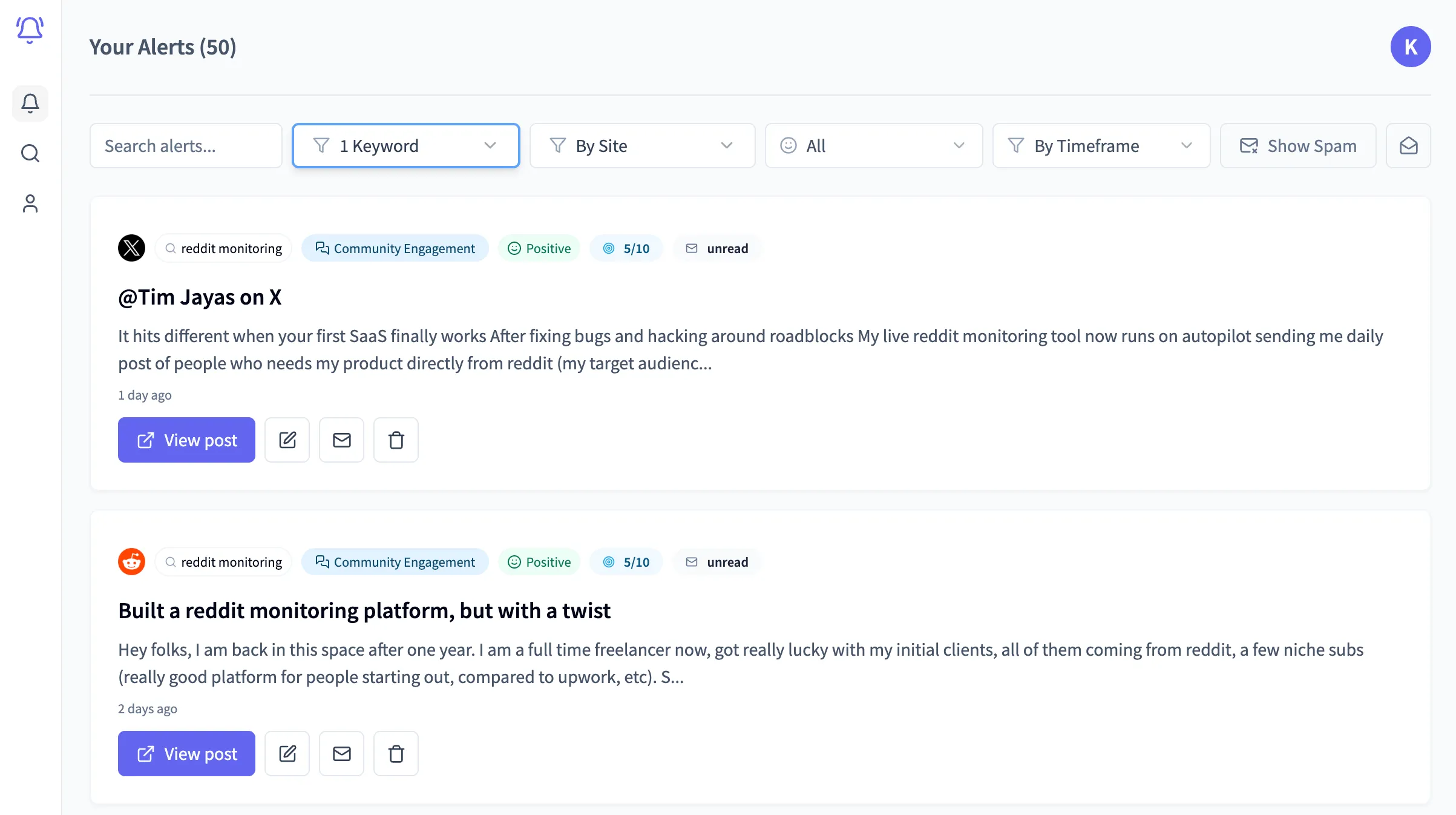
Triage in 3 buckets
- 🔥 Action now: alternatives, vs, switching, urgent complaints.
- 🧠 Learn: feature gaps, objections, positioning debates.
- 📣 Amplify: competitor campaign angles you can counter (or outperform) with content.
7. Action Playbooks: What To Do With the Signal
Competitor monitoring only creates leverage when it changes what you do next. Here are simple playbooks you can run immediately.
Sales playbook: win competitive deals
Trigger: “Is there an alternative to [competitor]?”
Action: Reply with value first, then offer a comparison resource.
Asset to build: A 1-page “You vs Competitor” checklist.
Marketing playbook: ship counter-messaging
Trigger: competitor backlash (pricing, outages, trust issues).
Action: Publish a page that addresses the pain directly (without naming them).
Asset to build: “Pricing calculator” or “migration guide”.
Product playbook: prioritize what moves churn
Trigger: repeated “I wish [competitor] had…” threads.
Action: tag the theme → validate with 5 customer calls → ship.
Asset to build: roadmap notes tied to real quotes.
Support playbook: capture competitor pain
Trigger: competitor support horror stories.
Action: tighten your onboarding + document your SLA and support promise.
Asset to build: “What great support looks like” page.
Reply templates (keep them human)
Bad reply
Try our tool — it's better than [competitor]. Book a demo!
Good reply
If you’re evaluating alternatives, what’s the 1–2 things you need most (price, integrations, reporting)? Happy to share a quick comparison checklist — we built ours after running into the same issues.
8. Common Pitfalls (and How to Avoid Them)
📉 Tracking vanity metrics instead of intentFollower counts and likes don’t equal pipeline. Prioritize switching/comparison/pricing keywords.
🌪️ Keyword noiseMonitoring a competitor name alone catches irrelevant chatter. Use intent phrases (“alternative”, “vs”, “pricing”, “cancelled”).
🧍 No ownershipIf no one owns triage, alerts pile up. Route “Action now” items to a single inbox or owner.
🧩 Not turning insight into assetsThe highest ROI is building reusable assets: comparisons, migration guides, objection handling, and FAQ pages.
9. Next Steps: Your 20-Minute System to Monitor Competitors
- List your top 5 competitors (include product names and common misspellings)
- Create an intent keyword set: alternative, vs, pricing, switching, cancelled, support
- Add 3–5 category keywords: best, recommend, tool for, software for
- Set a daily digest review (10 minutes) + a weekly insight review (10 minutes)
- Turn the top repeated theme into one asset (comparison, migration guide, or FAQ page)
Stop guessing what your competitors are winning on
Alertly helps you monitor competitor conversations across social media so you can respond faster, position better, and win more deals.